Matchmaking
Queue System
Join the queue, get matched, and drop straight into your team's private channel — no tickets, no waiting on staff.
How It Works
From Queue to Match
01
Join the Queue
Head to the queue channel and click Join Queue to claim a slot. Leave anytime before the match locks in.
02
Teams Fill Up
Once both Slot 1 and Slot 2 are full, the queue locks and the system starts forming your match.
03
Private Team Channels
Two private channels are created automatically — Team Red and Team Blue — and every player is moved into the channel for their assigned team.
Team Red
Private channel created
Team Blue
Private channel created
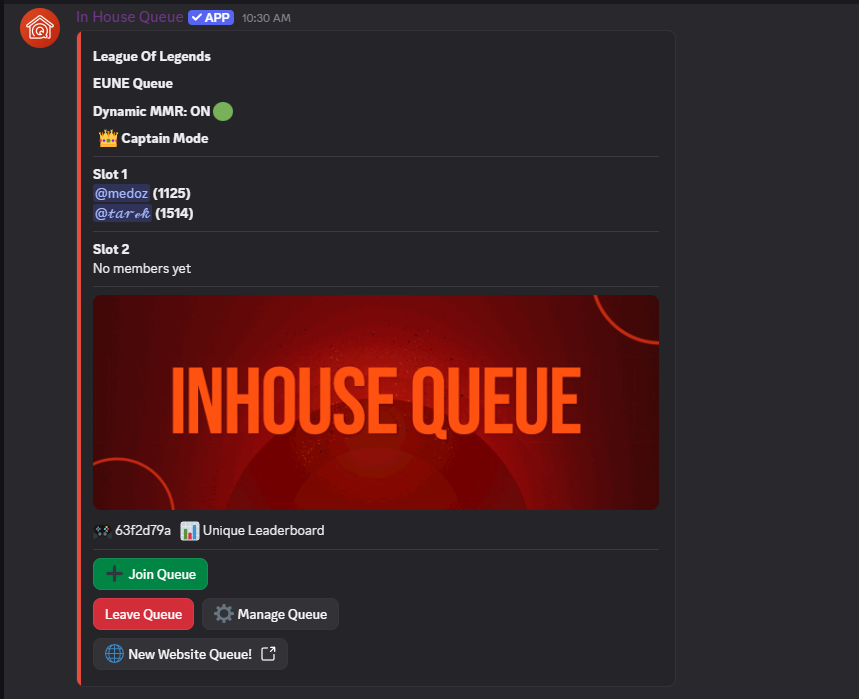
Live In Discord
The Queue Panel
Every queue posts a live panel right in Discord. Players see the game, region, and whether Dynamic MMR or Captain Mode is active, then join Slot 1 or Slot 2 with a single click. When a slot fills up, the panel updates instantly for everyone watching.
- ▸Join or leave the queue with one click, no commands to remember
- ▸Slot status updates live so you always know how close the match is
- ▸Manage Queue controls let moderators adjust or reset a stuck lobby
Dynamic MMR
Team balance recalculates in real time as players join, keeping every match fair.
Captain Mode
Optional captain-pick drafting for queues that want more control over team composition.
Unique Leaderboard
Every queued match feeds the community leaderboard automatically — no manual reporting.